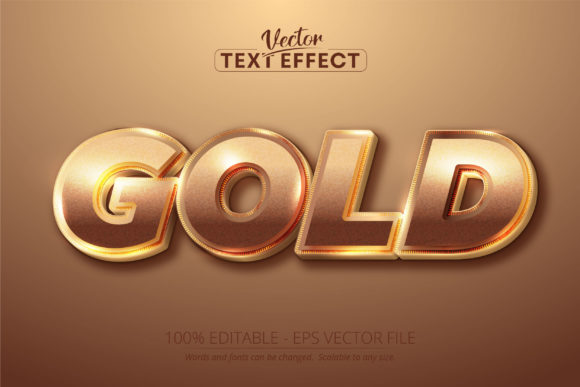
Shiny Gold Color Editable Text Effect: Elevate Your Designs
When a project calls for a touch of undeniable luxury and immediate impact, the Shiny Gold Color Editable Text Effect delivers precisely that. This is not a conventional typeface you install and select from a font menu. Instead, it's a specialized Adobe Illustrator asset—a pre-styled, fully editable text effect that applies a realistic, lustrous gold finish to any lettering you choose. The visual result is a rich, polished metallic effect complete with subtle gradients and highlights that mimic the depth and gleam of real gold. It communicates prestige, success, celebration, and high value in a single glance.
Understanding the Asset: More Than a Font
It's crucial to understand what this asset is and isn't. The Shiny Gold Color Editable Text Effect is an Adobe Illustrator EPS (CS6 format) file. This means it is a premium font effect, not a standalone font or typeface. You cannot install it in your operating system to use in Microsoft Word or other applications. Its power is unlocked specifically within Adobe Illustrator, where its 100% editable nature truly shines. You can change the words, resize the text to any dimension without losing quality, and even tweak the underlying gradient and style settings to customize the metallic sheen further. This scalability is a fundamental advantage for logo design, large-format prints, and high-resolution digital displays.
The personality of this effect is bold and authoritative. It’s a display font style at heart, meaning it’s engineered for headlines, titles, and short bursts of text where visual impact is the primary goal. It carries the weight and structure often associated with a strong serif font or a clean sans serif font, but the transformative gold layer adds a layer of opulence. This isn't the font for body copy in a lengthy report; it's the centerpiece that draws the eye and sets a definitive tone.
Strategic Applications: Where Gold Makes an Impact
The versatility of the Shiny Gold Color Editable Text Effect allows it to serve across a stunning array of projects. Its core strength lies in elevating perceived value and creating a focal point.
- Brand Identity & Logo Design: For brands in luxury goods, high-end services, finance, or premium crafts, this effect can become a cornerstone of a brand identity. A gold-accented logo instantly suggests exclusivity and quality. It works exceptionally well for monograms, brand marks, or taglines within a logo system.
- Marketing & Social Media Graphics: In the crowded space of social media graphics, a shiny gold headline stops the scroll. It’s perfect for announcing sales, celebrating milestones, promoting premium product launches, or creating eye-catching story templates. The effect ensures your message feels important and worthy of attention.
- Publishing & Editorial Design: Think of book covers, magazine mastheads, chapter titles, or certificates. This creative font effect adds a layer of sophistication to editorial design, making publications feel more authoritative and collectible. It can signal a special edition or a premium content offering.
- Packaging & Product Design: On packaging design, gold text is a classic cue for premium ingredients, limited editions, or gift-worthy presentation. Whether it’s the name of a gourmet product, a cosmetic line, or a luxury candle, the effect communicates quality before the customer even interacts with the product.
- Digital & Print Projects: Beyond the obvious, it’s effective for award certificates, event invitations, menu headers for upscale restaurants, presentation title slides, and website hero sections. Its vector-based nature ensures it looks crisp in both web design mockups and final printed materials.
Design Considerations and Practical Integration
Using such a powerful design asset effectively requires thoughtful integration. The goal is to complement, not overwhelm, your overall design.
Readability is Paramount. While the Shiny Gold Color Editable Text Effect is stunning, its primary function is communication. Always prioritize clarity. This effect works best with clean, well-spaced typefaces. Highly ornate or overly condensed script fonts or handwritten fonts may lose legibility when transformed into gold. Test your chosen text at the intended viewing size to ensure every letter is distinct.
Mastering Font Pairing. The gold effect is a dominant visual element. Pair it with simplicity. A classic combination is a shiny gold serif font for a headline paired with a neutral, highly readable sans serif font for subheadings and body text. This creates a clear visual hierarchy where the gold element commands attention without creating visual chaos. Let the gold text be the star, supported by a calm and professional supporting cast.
Context and Audience. Evaluate if the luxurious tone aligns with your project's message and audience. For a children's birthday party flyer, it might feel overly formal. For a corporate award ceremony or a high-fashion lookbook, it’s perfectly suited. The effect influences brand perception; use it to reinforce the specific qualities you want your audience to associate with your work—be it prestige, celebration, or elite craftsmanship.
Technical Workflow. Since it’s an Illustrator file, your workflow begins in Adobe Illustrator. Open the provided EPS file, locate the editable text layer, and use the Type Tool to input your own words. Explore the Appearance panel to see how the gold effect is constructed with gradients and effects; this allows for advanced customization if needed. Remember, this is a commercial font effect, so ensure you adhere to the licensing terms for your intended use, whether personal or commercial.
In essence, the Shiny Gold Color Editable Text Effect is a powerful tool in a designer's arsenal for specific, high-impact applications. Used with intention, it transforms ordinary text into a statement piece, directly influencing audience engagement by signaling importance and quality. It’s a practical shortcut to achieving a polished, professional, and luxurious aesthetic across a multitude of creative and commercial projects.